How I have vibe-coded a personal budgeting assistant

Over the weekend, I managed to (vibe) code an AI-powered budgeting assistant. This comes from an idea where I would like to ask questions about my spending behaviour, and I don't want to spend a lot of time doing deep dive analysis on my own, so I would like the agent to handle it.
And the best part is I managed to do it with free Chat GPT Codex and Google's Antigravity! This shows that these tools have come a long way from just chatbots to be able to build something from end to end, just from ideation.
Architecture
First, let's talk about the architecture. I use Actual Budget, which is an open-sourced envelope-based budgeting system, which I have hosted using Pikapods. Normally, at weekends, I will manually import/add my transaction data (and I am exploring how I can utilise AI to automate, more on that in the next project!) into Actual budget and do budgeting. But one thing missing is proper, deep analysis and data-driven budgeting. We’ve all been there: staring at a banking app or a sprawling spreadsheet, trying to figure out why "Miscellaneous" was so high last month. Or how much I have been saving. So I really would like to use AI to handle that part. However, some things are non-negotiable:
- The agent has to be run fully local and privacy-first, and the data cannot leave my machine. This is important to me as it is the most sensitive data.
- There should be a dashboard that can display charts better than what the Actual budget interface can provide (because let's be honest, Actual does a great job at it!)
- I need a chat interface so that I can talk in a natural language rather than doing my own analysis.
And thus, Budget Agent is born! It is a local-first tool that connects to Actual Budget, runs on your own hardware, and uses local LLMs to give you deep insights into your spending.
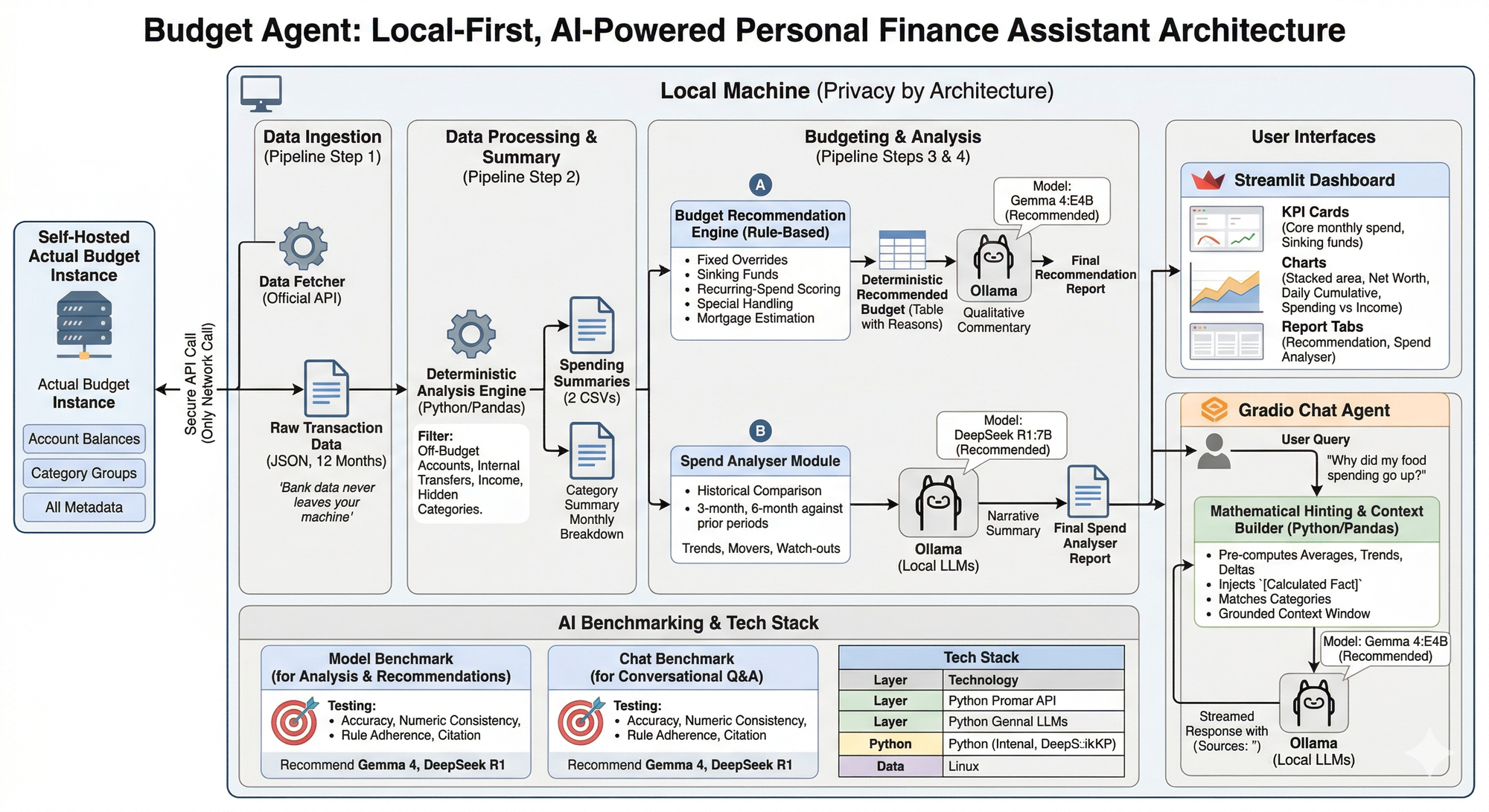
Below is an architecture diagram of what it looks like!
1. The Data Pipeline: Securing the "Bridge"
The first challenge is getting the data out of the budget and into an environment where I can process it. This is where I learned that Actual Budget has an official API that allows you to export the data to your local machine (all you have to do is provide your login credentials). I use a Node.js bridge to securely fetch the last 12 months of transactions. This is the only network call the tool makes, and it talks only to your own Actual server.
Below is an example code snippet of how it looks.
// bridge/fetch-transactions.js (Simplified Example)
const api = require('@actual-app/api');
const fs = require('fs');

async function fetchTransactions() {
  await api.init({ dataDir: './data', serverURL: process.env.URL, password: process.env.PW });
  await api.downloadBudget(process.env.BUDGET_ID);

  const accounts = await api.getAccounts();
  let allTransactions = [];

  for (const account of accounts) {
    const txs = await api.getTransactions(account.id, '2023-01-01', '2023-12-31');
    allTransactions = allTransactions.concat(txs);
  }

  fs.writeFileSync('transactions.json', JSON.stringify({ transactions: allTransactions }));
  await api.shutdown();
}
This code will then give you Raw Transactions data in JSON format.
2. Deterministic First, AI Second
One of the biggest risks with using LLMs (Large Language Models) for finance is "hallucination". LLMs are notorious for struggling with basic arithmetic in a chat window.
To solve this, the Budget Agent follows a strict rule: The AI isn't allowed to do the math. Instead, I use Python's Pandas library to establish a mathematical "ground truth" before the AI ever sees the data. This is where the Data Processing part comes in at this stage.
Basically, the Python code will clean and group the raw Transactions data into a usable format.
Below is an example:
# analyze.py (Simplified Example)
import pandas as pd

def build_deterministic_summary(transactions_df):
    df = transactions_df.copy()
    df['month'] = df['date'].dt.to_period('M')

    # Calculate exact monthly totals
    monthly = df.groupby(['month', 'category', 'group'])['amount'].sum().reset_index()

    # Calculate reliable historical averages and smooth out "lumpy" spending
    avg = monthly.groupby(['category', 'group'])['amount'].agg(
        avg_monthly='mean',
        months_active='count',
        total_spent='sum'
    ).reset_index()

    avg['spread_monthly'] = avg['total_spent'] / 12.0
    return avg.sort_values('avg_monthly', ascending=False)
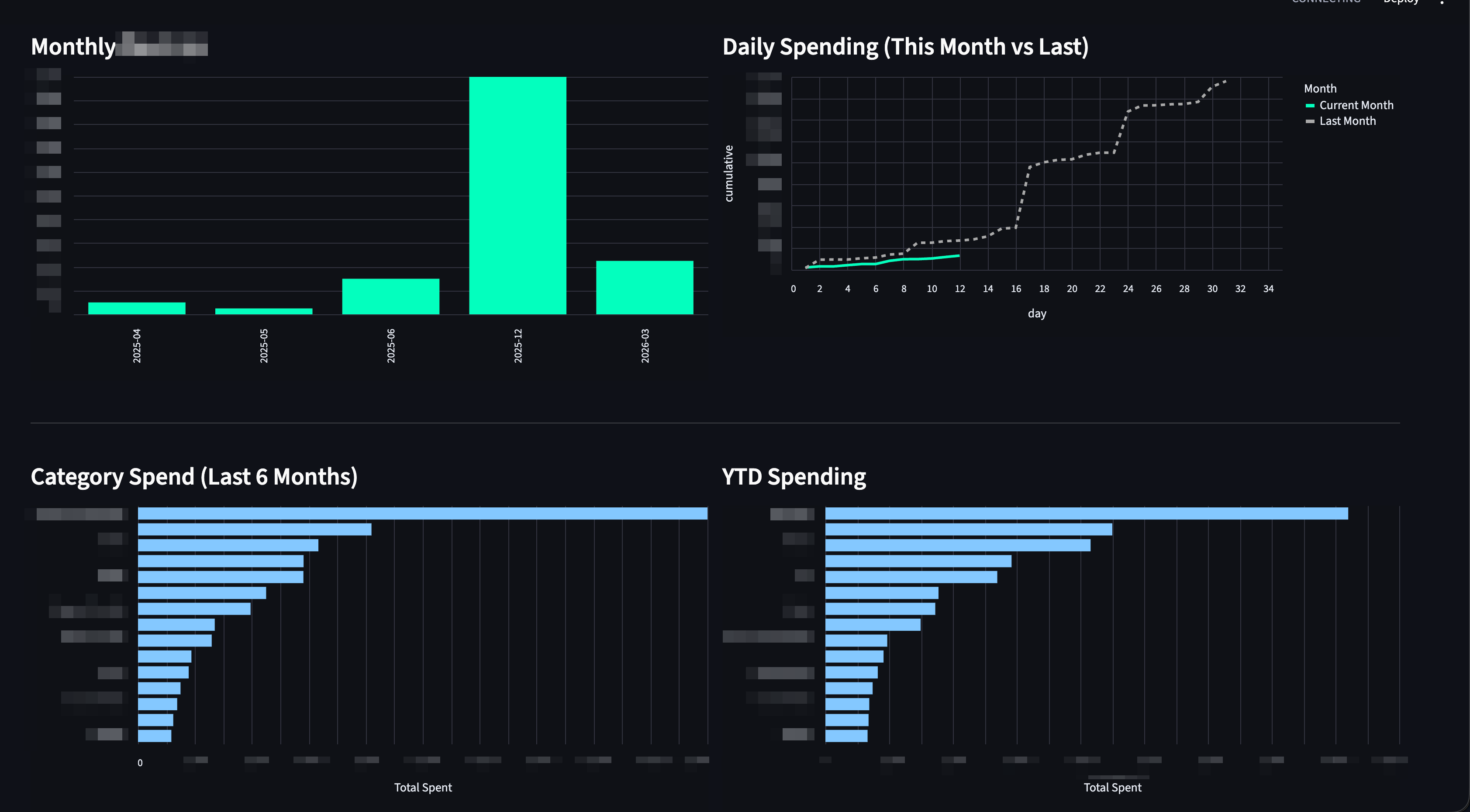
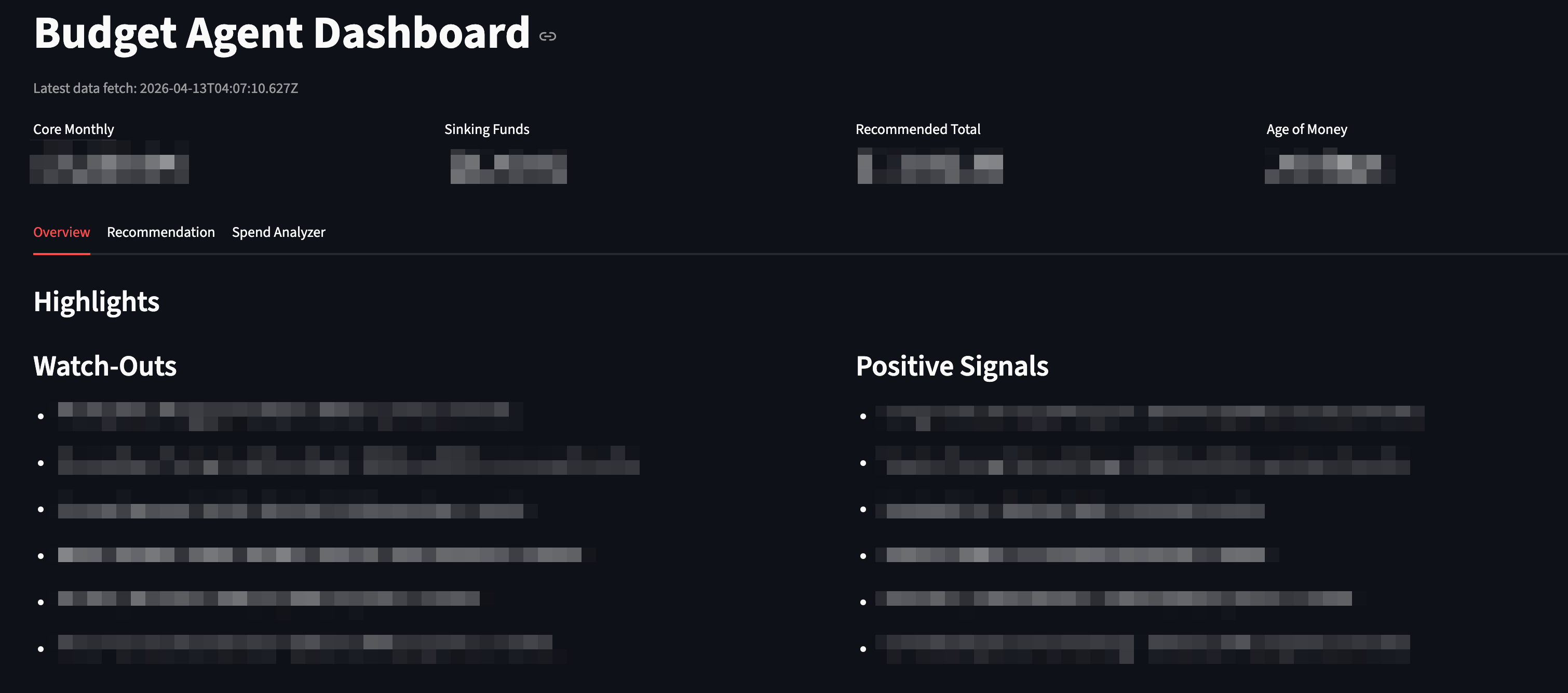
These clean datasets are then fed into a highly visual, professional-grade Streamlit Dashboard. The dashboard provides an extensive overview, including:
- Daily Spending Comparisons: Cumulative spending tracking between the current and previous month to visualise run-rates.
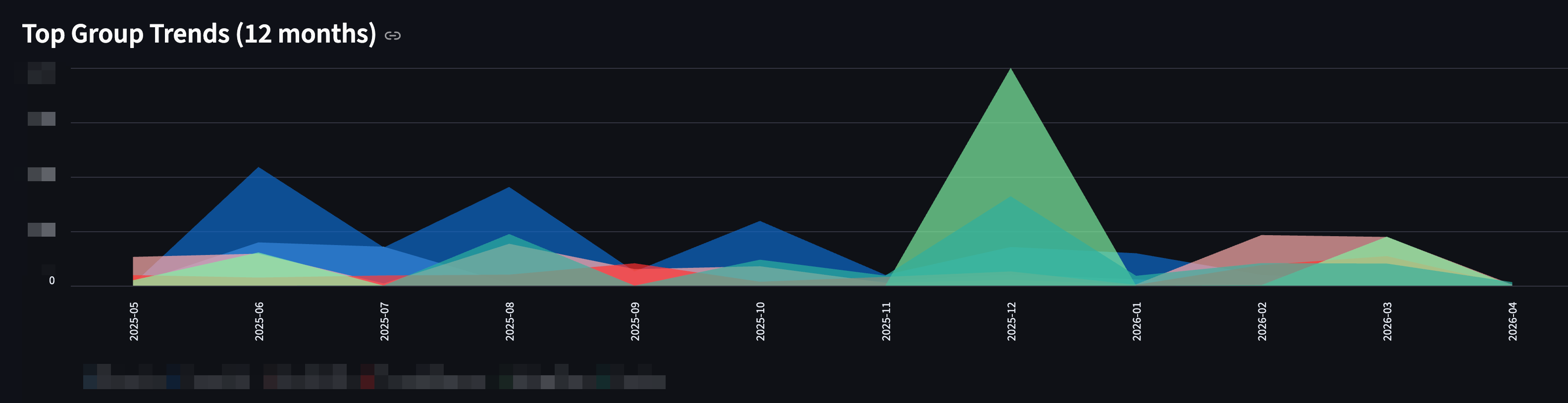
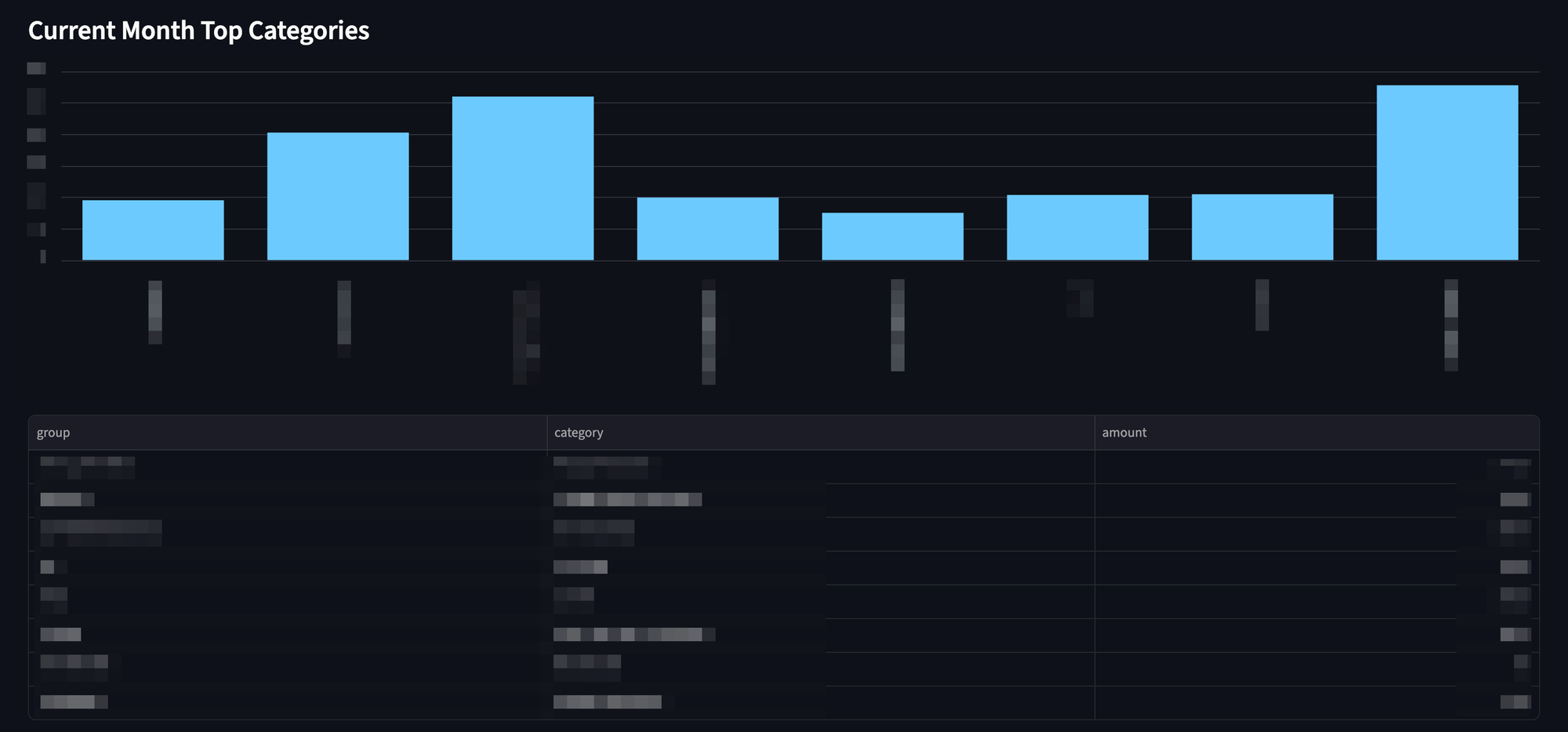
- Visual Trends: Net worth tracking, Spending vs. Income matrix, YTD spending, and 6-month category bar charts.
- Sinking Funds and Highlights: Auto-generated metric cards highlighting core monthly spend vs. sinking funds.
3. Budgeting and AI Analysis
The real magic happens when I layer localised AI models on top of the clean data.
The project employs AI for three distinct tasks.
1. The Budget Recommender: This module takes my categorised historical spending and generates a comprehensive, markdown-formatted financial plan. It calculates a recommended monthly budget and intelligently groups them into "Core Spending" and "Sinking Funds" (for irregular expenses), explicitly highlighting what's fully realistic given your history.
2. The Spend Analyser behaviour: This acts as an automated financial auditor. It parses recent spending behavior to spot anomalies and trends. The analyser generates a narrative report featuring:
- Watch-Outs: Areas where spending has accelerated unexpectedly.
- Positive Signals: Areas where savings have improved.
- Movers: Categories stepping significantly upward or downward in recent months
The Local AI Call Snippet
To generate these reports, the pre-calculated summary is passed to the local Ollama instance. Notice how the prompt strictly requests the model to rely only on the provided summary text:
# spend_analyzer.py (Simplified Example)
import requests

def ask_llm_narrative(summary_text: str) -> str:
    prompt = f"""You are a practical spending analyst.
Based ONLY on this computed analysis summary, write:
1) Short Narrative (3-5 sentences)
2) Key Watch-Outs (3 bullets)

Summary:
{summary_text}
"""
    # API call to the completely offline local model
    response = requests.post(
        "http://localhost:11434/api/generate",
        json={
            "model": "deepseek-r1:7b",
            "prompt": prompt,
            "stream": False,
            "options": {"temperature": 0.2}
        }
    )
return response.json().get("response", "")- The Grounded AI Chat Assistant: While reports are great, sometimes you just want to talk to your data. I built an interactive Chat App where you can ask complex qualitative questions.
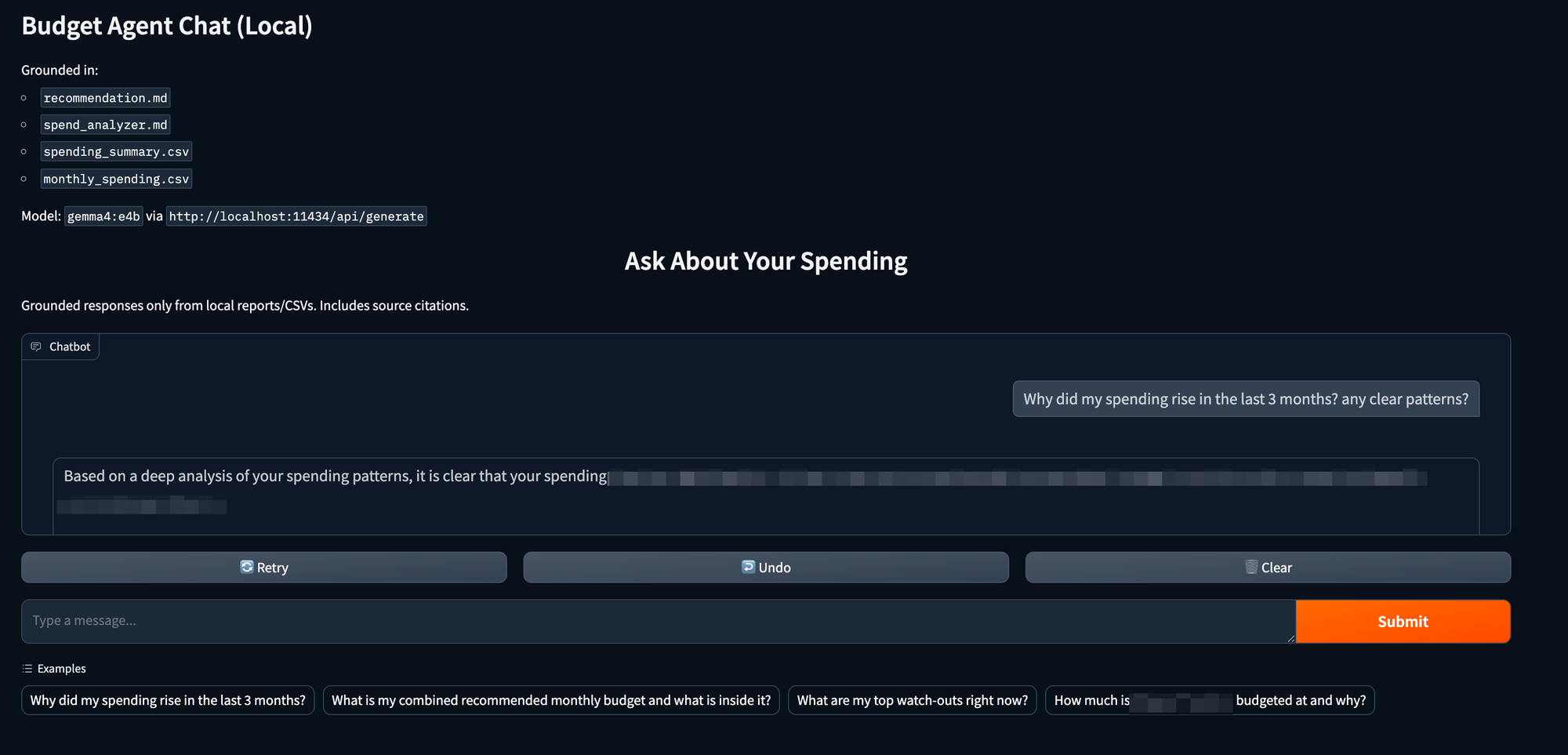
One of the biggest risks of using LLMs for finance is their tendency to "hallucinate" math. To solve this, the chat pipeline uses a technique called Mathematical Hinting. Before sending your prompt to the LLM, the backend uses Python (pandas) to definitively calculate the math related to your question and injects it as a `[Calculated Fact]` into the hidden prompt context. This forces the LLM to rely on hardened, exact numbers to formulate its narrative, resulting in extremely accurate and fluent answers.
How Math Hinting Looks in Code:
# chat_app.py (Simplified Example)
def chat_reply(user_question: str, context: str, monthly_df: pd.DataFrame):

    # 1. Pre-calculate exact math if trends/comparisons are asked
    hints = ""
    if "increase" in user_question or "trend" in user_question:
         # Uses Pandas to calculate the exact delta and injects it as text
        hints = compute_mathematical_hints(user_question, monthly_df)

    # 2. Build a strict, context-bound prompt
    prompt = f"""You are an analytical financial assistant.
Answer using ONLY the supplied context.
If you need to do math, rely on the [Calculated Fact] clues provided.

User Question: {user_question}

Context Data:
{context}

Mathematical Hints:
{hints}
4. Benchmarking Local Models
Because financial advice needs to be precise, I didn't just pick a trendy model and hope for the best. I built a benchmarking suite to evaluate local models (running via Ollama) on accuracy, numeric consistency, and their ability to cite sources. Also they should be able to run on my Mac which is M1 Mac Pro with 16GB RAM.
I asked Gemini to recommend some models to me, and these three models are chosen to be benchmarked:
- qwen2.5:14b
- gemma4:e4b (newest model from Google)
- deepseek-r1:7b
These models are then subjected to rigorous, formatted evaluations focused on:
- Accuracy and Rule Adherence: Did the model follow formatting constraints?
- Numeric Consistency: Did the numbers generated match the source context perfectly?
- Citation: Did the chat model accurately quote its sources?
- Latency/Speed: How fast did the model generate tokens locally?
Again, here I would like to say that this test is built entirely by Codex with just a few prompts.
The Results & Selection:
Budget Recommendation: `gemma4:e4b` was chosen. It scored a perfect 1.00 for accuracy and reliably synthesised complex spending rules into a cohesive summary.
Spend Analyser: `deepseek-r1:7b` was crowned the winner here. It hits perfect numbers on numeric accuracy and was significantly faster (latency of ~70s vs 86s for creating the deep analysis), making it perfect for narrative data breakdown.
Interactive Chat: `gemma4:e4b` won the chat capability, scoring heavily in Citation (70%) and Numeric Consistency (100%). Its ability to parse the injected Context and Math Hints outpaced the competition, making it a highly reliable and safe assistant.
5. The User Interface: Dashboard & Chat
Finally, all this data is surfaced through two interfaces:
- Streamlit Dashboard: Provides visual trends, net worth tracking, and daily cumulative spending comparisons to visualize my "run-rate".
- Gradio Chat Assistant: A context-aware interface where you can have a natural language conversation with your data, with every answer having a reference
Sources:line for verification.
A couple of screenshots on how the dashboard looks (I have removed all sensitive info!)
It also has Recommendations and Spend Analyser, but I won't post them here as I literally have to censor the whole thing; trust me, they are good!
And here is how the Chat interface looks!
Wrap Up and Learnings
It has been a good learning experience while building this.
Benefits of locally run AI
In an era of cloud-hosted AI, building this pipeline entirely locally was a deliberate, non-negotiable choice. Personal financial data is highly sensitive. By leveraging Ollama to host lightweight, incredibly powerful models directly on the machine, you get enterprise-level AI capabilities with absolute zero data privacy risk. Your transactions, net worth, and financial anomalies never leave your hard drive.
Trust but Verify
Because it is your financial data, you clearly know if something went wrong. This is where Antigravity or Codex Planning mode is super useful. I will spot some numbers not matching what I know, so I will ask questions about how it is being calculated and verify the logic. And AI can look into these and fix the logic for you if needed.
Iterate, Iterate and Iterate
I spent quite a lot of time on the Budgeting Assistant as the first iteration contains recommendations to budget for Categories that are no longer in use (like, for example, my Student Loans!). So I need to carefully iterate through each category and mention that some categories will always have a fixed amount every month (like a Netflix subscription), and some can be one-offs (like a vacation). This is also why I won't be able to share my entire code on GitHub for this project, as there are a lot of rules that I have added to make the budget assistant my own!
By combining this strict Python-scripted math with the nuanced, narrative power of localised LLMs, this Budget Agent successfully bridges the gap between cold spreadsheets and having a personal financial advisor right on your desktop. It doesn’t just show you what you spent—it confidently tells you why you spent it, what to watch out for, and does it all effortlessly under your complete control.
Hope this is useful, let me know your thoughts!